


How To Adjust Acura Seat Position and Temperature Controls
How to Adjust The Front Seats In Your St. Louis Acura
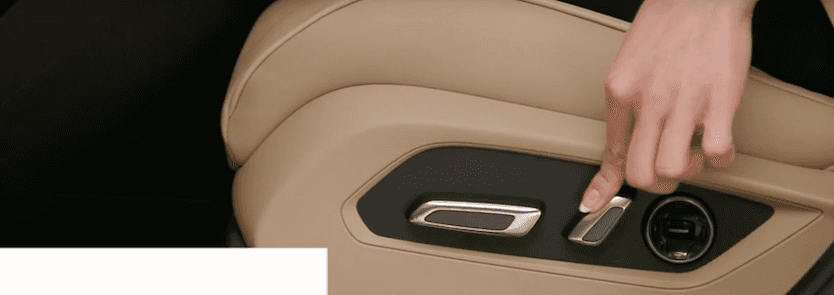
Crafted with your comfort in mind, the front seats in your Acura are engineered to adjust to a variety of seating arrangements. Drivers can start by locating the seating controls on the side of the driver’s seat. The horizontal bar located closest to the front of the vehicle can be pulled up or down to adjust the seat height, or pushed forward or backward to move the cushion angle in the respective direction.
The vertical bar found in the middle can be pressed forward or back to control the seatback angle while the circular button furthest from the front of the vehicle can be used to adjust lumbar support in non-Advance models. Drivers need only press up or down, or in or out to correctly position their seat.
Choose an Acura RDX Vehicle In St. Louis with Advance Package
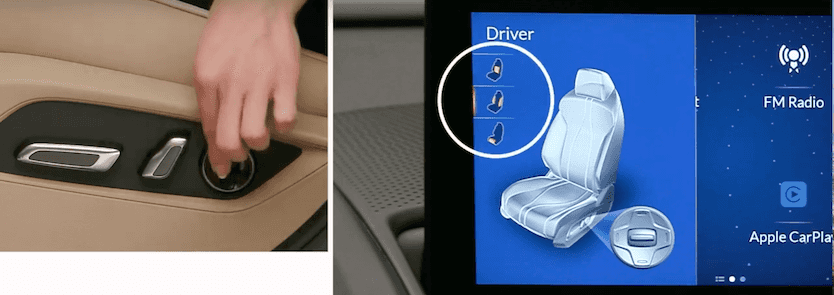
On Acura RDX models equipped with the Advance Package, St. Louis drivers can activate the toggle switch found on the circular button to show the seat features on the On Demand Multi-Use Display™ screen. Once displayed, it’s easy to switch between and adjust lumbar, side bolsters, or thigh support features using the circular button. Just press the touchpad to close the seat display when you’ve finished modifying your seat.
Find The Right Temperature For Your Drive In St. Louis
To further maximize and tailor your comfort, RDX vehicles with the Advance Package allow you to synchronize your seat with the climate control system or manually adjust the heating and ventilation yourself. Drivers can do so by first pressing the Auto button on the center console then push the heating or ventilation (if equipped) button. Simply press once for high, twice for mid, three times for low, or four times to turn it off.
Feel free to contact us at Frank Leta Acura to learn how you can further adjust the comfort settings in your Acura vehicle.


